Generate original cookie cutter designs with AI
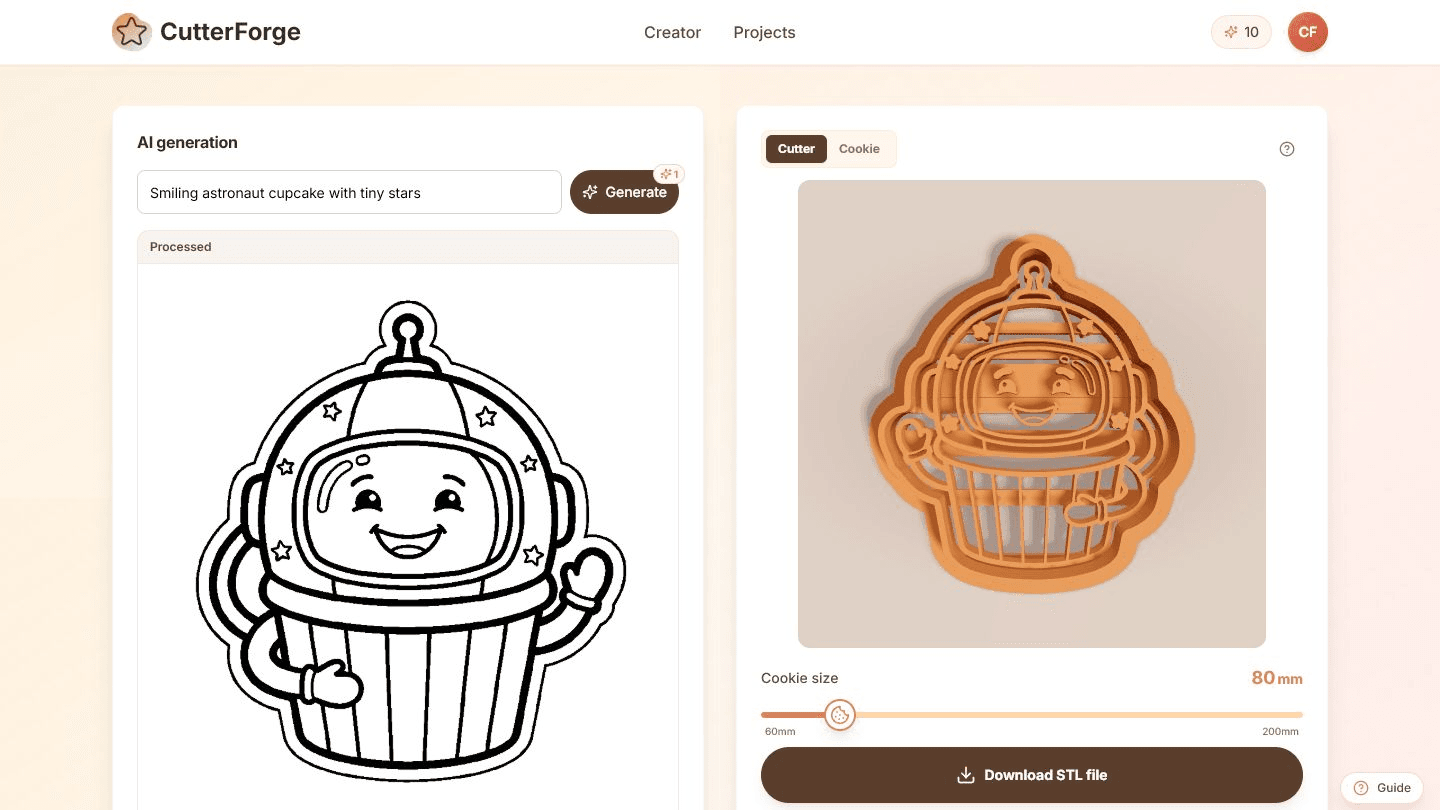
Use the AI cookie cutter generator when you have an idea but no artwork. Describe a simple subject, review the processed design, preview the cutter, and download the STL file.
Built for the real path from idea to cookie cutter.
Describe one clear subject with a few style words, such as a smiling astronaut cupcake, a bold star icon, or a cute holiday shape.
CutterForge processes the generated image into a cutter preview and prepares it for STL download.
Generate variations quickly with prompts like "cute dinosaur outline", "simple tulip icon", "bold birthday cake shape", or "smiling ghost cookie cutter".
Four steps, then a file you can print.
- 01
Write one clear prompt with a simple subject.
- 02
Generate a black-and-white cutter-friendly design.
- 03
Review the processed mask and 3D cutter preview.
- 04
Download the STL when the geometry is ready.
Useful for more than one shape.
What this workflow produces
Example input
A short prompt like "cute dinosaur outline", "simple tulip icon", "bold birthday cake shape", or "smiling ghost cookie cutter".
Example output
A cutter-friendly generated image processed into a preview and printable STL for a themed cookie cutter.
Export details before you print
Files you get
- Generated design preview
- STL file for the cutter
- Project thumbnail for saved AI generations
Inputs supported
- Short descriptive prompts
- Simple subject and style combinations
- Holiday, party, bakery, and gift ideas
Slicers and printers
STL exports can be prepared in Bambu Studio, PrusaSlicer, OrcaSlicer, Ultimaker Cura and similar slicers for printers such as Bambu Lab, Prusa, Creality, Anycubic, Elegoo.
Start near 1.0 mm for AI-generated cutters, then increase wall thickness for complex silhouettes or larger sizes.
Printing tips
- Prompt for simple outlines instead of detailed scenes.
- Regenerate if the design has too many tiny disconnected details.
- Use slicer preview to confirm the outer wall is continuous.
Limitations to know
- AI may create decorative details that are too small for a cutter.
- Exact brand, character, or logo reproduction is not what this workflow is for.
- Generated designs may need another attempt to get a clean silhouette.
AI, image upload, or text mode?
Use AI when
Use AI when you need a new concept, theme, or character-style idea from words.
Use image upload when
Use image upload when you already have approved artwork or a logo that must be followed closely.
Use text mode when
Use the text tool when the result should be exact words rather than an illustrated object.
Avoid weak cutter files
Writing prompts for full scenes instead of one cutter-friendly subject.
Requesting very fine texture, shading, or background detail.
Using AI when an exact logo or exact text layout is required.
Printing the first generation without checking small details in the slicer.
Common questions
How does the AI cookie cutter generator work?
You enter a prompt, CutterForge generates and processes the image, then the tool creates a cutter preview and STL download.
What prompts work best?
Simple subjects with bold shapes work best. Avoid crowded scenes and protected brands or characters.
Can AI designs be downloaded for printing?
Yes. Once processing is complete, the AI workflow provides an STL download.
When is AI better than image upload?
AI is better when you do not have artwork yet and want to explore original concepts quickly.
When is AI worse than image upload?
Image upload is better when you need to match a specific logo, drawing, or supplied artwork.
Can AI create detailed cookie cutters?
It can create detailed ideas, but cutter geometry still needs simple, printable walls. Simpler prompts usually produce better prints.
What wall thickness should AI cutters use?
Start around 1.0 mm and increase if the design is large, has narrow curves, or will be used heavily.
Can I sell AI-generated cutter files?
Check your local rules, marketplace policies, and any rights in your prompts or source ideas before selling generated products.
What if the generated shape is not printable?
Try a simpler prompt, reduce detail, or switch to image upload with cleaned artwork for tighter control.